 |
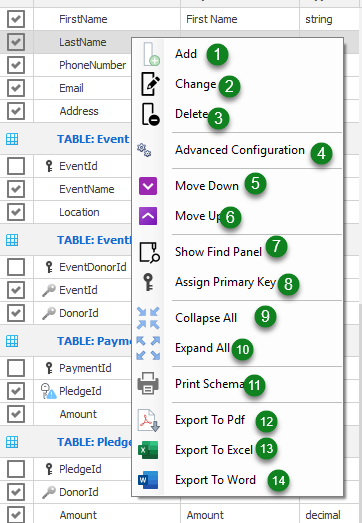
- Add -
- Change -
- Delete -
- Advanced Configuration -
- Move Down -
- Move Up -
- Show Find Panel -
- Assign Primary Key - This allows you to assign a primary key to a table that doesn't have a primary key.
- Collapse All - This collapses the contents of the Schema Dictionary so that only the tables names are shown.
- Expand All - The expands a collapsed grid.
- Print Schema - This will print the tables in the Schema Dictionary.
- Export To Pdf - This will export the tables in the Schema Dictionary to a pdf file.
- Export To Excel - This will export the tables in the Schema Dictionary to an Excel Spreadsheet.
- Export To Word - This will export the tables in the Schema Dictionary to a Word Document.
|