
Database
From Tools | Options - Database
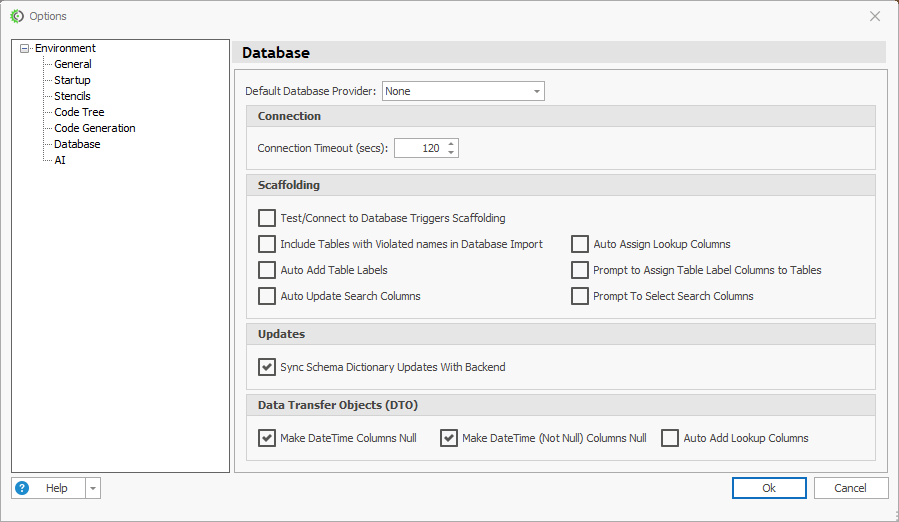
Default Database Provider
The database type pre-selected when you start a new connection or project, such as SQL Server, SQLite, MySQL, PostgreSQL or Oracle.
Community Edition: only SQLite is available. Any other value is reset to SQLite.
Connection
Connection Timeout (secs)
How long CodeStencil waits for the database to respond before giving up. The default is 120 seconds.
When you change this value, the timeout in the current default connection string is updated.
Increase it for slow servers or large databases.
Scaffolding
Controls what happens when CodeStencil reads your database and builds the Schema Dictionary.
Option | What it does |
|---|---|
Test/Connect to Database Triggers Scaffolding | When checked, clicking Connect scaffolds the database straight away and lists the tables and views. When unchecked, it only connects and loads the table and view list. |
Check for Name Violations | During import, checks table and view names for reserved words and other names that would break generated code. |
Include Tables with Violated names in Database Import | When unchecked, tables with violating names are unchecked in the import list so they are skipped. When checked, they stay selectable. Needs Check for Name Violations to be useful. |
Auto Add Table Labels | After import, picks a Table Label column (the column that represents a row in lists and lookups) for each table that doesn't have one. |
Prompt to Assign Table Label Columns to Tables | Opens a form so you choose the label columns yourself. Applies only when Auto Add Table Labels is checked. |
Auto Update Search Columns | After import, finds tables without Search Columns and sets them automatically. |
Prompt To Select Search Columns | Asks which columns to use as search columns. Applies only when Auto Update Search Columns is checked. |
Auto Assign Lookup Columns | Automatically assigns lookup columns for foreign keys. |
Tip: A table with no Search Columns can cause compile errors in generated code. Keep the search column options on, or set them later in the Schema Dictionary or Advanced Configuration form.
Updates
Sync Schema Dictionary Updates With Backend
Checked by default. When you edit a table or column in the Schema Dictionary, CodeStencil runs the matching change against the real database. If the change fails, you'll see "Schema Dictionary probably out of sync with database".
Uncheck it to change only the Schema Dictionary and leave the database untouched.
Data Transfer Objects (DTO)
Option | What it does |
|---|---|
Make DateTime Columns Null / Make DateTime (Not Null) Columns Null | Makes non-nullable DateTime columns nullable in the generated DTOs only. The database is not changed. This avoids errors in UI libraries such as MudBlazor, whose date pickers fail on non-nullable dates. |
Auto Add Lookup Columns | Automatically adds lookup columns to DTOs. |
Notes
Changes apply when you click OK.
Most scaffolding options take effect the next time you import or refresh a database, not on existing data.