
Triggered By Expander
To create a similar result after code generation:

(1) Create 3 expanders with the following settings:
| Expansion Label | Expansion String | Database Dependent | Linked Expander |
1 | DB_IN_USE |
|
|
|
2 | DB_IN_USE_SQLITE | UseSqlite | Sqlite | DB_IN_USE |
3 | DB_IN_USE_SQLSERVER | UseSqlServer | SqlServer | DB_IN_USE |

Note: It is important that you specify the matching database provider in the Database Dependent field. This is what triggers the code for the specific database you are using.
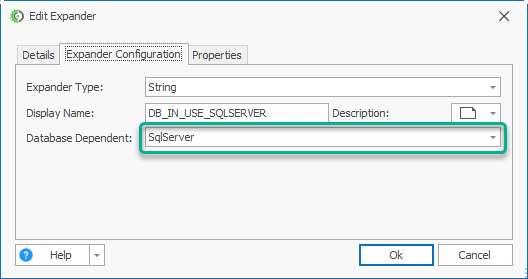
(2) From the CodeTree and in the Startup.cs node, add the expander - [%DB_IN_USE%] to replace the string - UseSqlite.

(3) This will ensure that whatever the current database is in use will trigger the expander [%DB_IN_USE%] to be replaced with the appropriate expander because we have "Linked" the expander.
